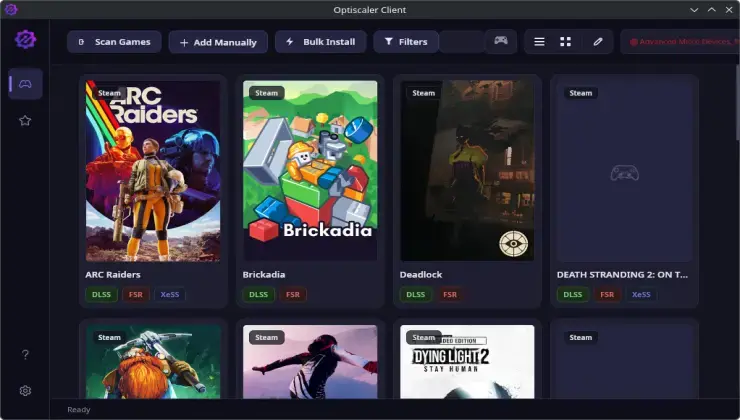
The latest update to OptiScaler Client, version 1.0.6, has arrived with a substantial list of improvements that will benefit Linux gamers and those using older hardware. This modern desktop utility, designed to streamline the installation and management of the popular OptiScaler mod, now includes native support for the Heroic Games Launcher, experimental gamepad navigation, and importantly, AMD’s FSR 4.1.1 technology optimized for older graphics processing units. These additions represent a significant step forward in making advanced upscaling technologies accessible to a broader range of users regardless of their hardware generation or preferred gaming platform.
OptiScaler has established itself as an essential tool for PC gamers seeking to enhance visual quality and performance through intelligent upscaling solutions. The mod works by intercepting rendering calls and applying sophisticated image reconstruction algorithms, allowing games to run at lower native resolutions while maintaining crisp, high-quality visuals. This approach has proven particularly valuable for users with mid-range or aging graphics cards who want to experience modern games without sacrificing too much in terms of frame rates or visual fidelity.
Heroic Games Launcher Integration Opens New Doors
The addition of Heroic Games Launcher support marks a significant milestone for the Linux gaming community. Heroic is an open-source game launcher that provides access to Epic Games Store and GOG libraries on Linux systems, filling a crucial gap since Epic Games has not released a native Linux client. With OptiScaler Client now recognizing and integrating with Heroic, Linux users can seamlessly apply upscaling modifications to their games without complex manual configuration. This integration reflects the growing importance of Linux as a gaming platform, particularly following the success of Valve’s Steam Deck and the broader adoption of Proton compatibility layers.
The implementation allows OptiScaler Client to automatically detect games installed through Heroic, configure appropriate settings, and manage mod updates across the entire library. Previously, users had to manually navigate directory structures and configure each game individually, a process that could be time-consuming and error-prone. The streamlined workflow now mirrors the simplicity that Windows users have enjoyed with traditional game launchers, removing another barrier to Linux gaming adoption.
Experimental Gamepad Support Enhances Accessibility
Version 1.0.6 introduces experimental gamepad navigation support, allowing users to configure and manage OptiScaler settings without reaching for a keyboard and mouse. This feature is particularly relevant for Steam Deck users and those who prefer a controller-based living room gaming setup. While still in experimental stages, the gamepad controls enable users to navigate menus, adjust upscaling parameters, and toggle features using familiar controller inputs. The development team has indicated they will refine this functionality based on community feedback in future releases.
The gamepad support reflects a broader industry trend toward accessibility and flexibility in how users interact with gaming software. As more players adopt handheld PCs and console-like setups for their computer gaming, tools that accommodate these usage patterns become increasingly valuable. The experimental nature of this feature means some limitations and bugs may exist, but early reports from testers suggest the core functionality works reliably for basic operations.
FSR 4.1.1 Brings Modern Upscaling to Older Hardware
Perhaps the most technically significant addition in this release is the implementation of AMD FidelityFX Super Resolution 4.1.1 with specific optimizations for older graphics cards. AMD’s FSR technology has gained considerable traction as a vendor-agnostic alternative to NVIDIA’s DLSS, working across a wide range of hardware including Intel and NVIDIA GPUs. Version 4.1.1 includes refinements to temporal stability and image sharpness while reducing the computational overhead, making it more suitable for legacy hardware that might otherwise struggle with modern upscaling algorithms.
For owners of graphics cards from previous generations, this update could breathe new life into their systems. The optimizations allow GPUs that would normally be excluded from advanced upscaling features to benefit from improved visual quality and potentially higher frame rates. This democratization of technology aligns with OptiScaler’s core mission of making performance-enhancing modifications accessible to all PC gamers, regardless of their budget or hardware vintage. Community members have already begun sharing performance comparisons showing notable improvements on cards like the GTX 1060 and RX 580, demonstrating the practical benefits of these optimizations.
Expert Opinion: The convergence of Linux gaming support, accessibility features, and legacy hardware optimization in OptiScaler Client 1.0.6 signals a maturing ecosystem where open-source tools increasingly match or exceed proprietary alternatives. As upscaling technology becomes essential for modern gaming, tools that extend these capabilities to broader audiences will likely see accelerated adoption, particularly among budget-conscious gamers and the growing Linux community.